

What a great time to be alive! AI tools and features are being released so quickly, too fast for most busy executives to keep up with. This article gives you a framework your brain can use to understand and file your knowledge about the tools that exist now and the new ones as they arrive.
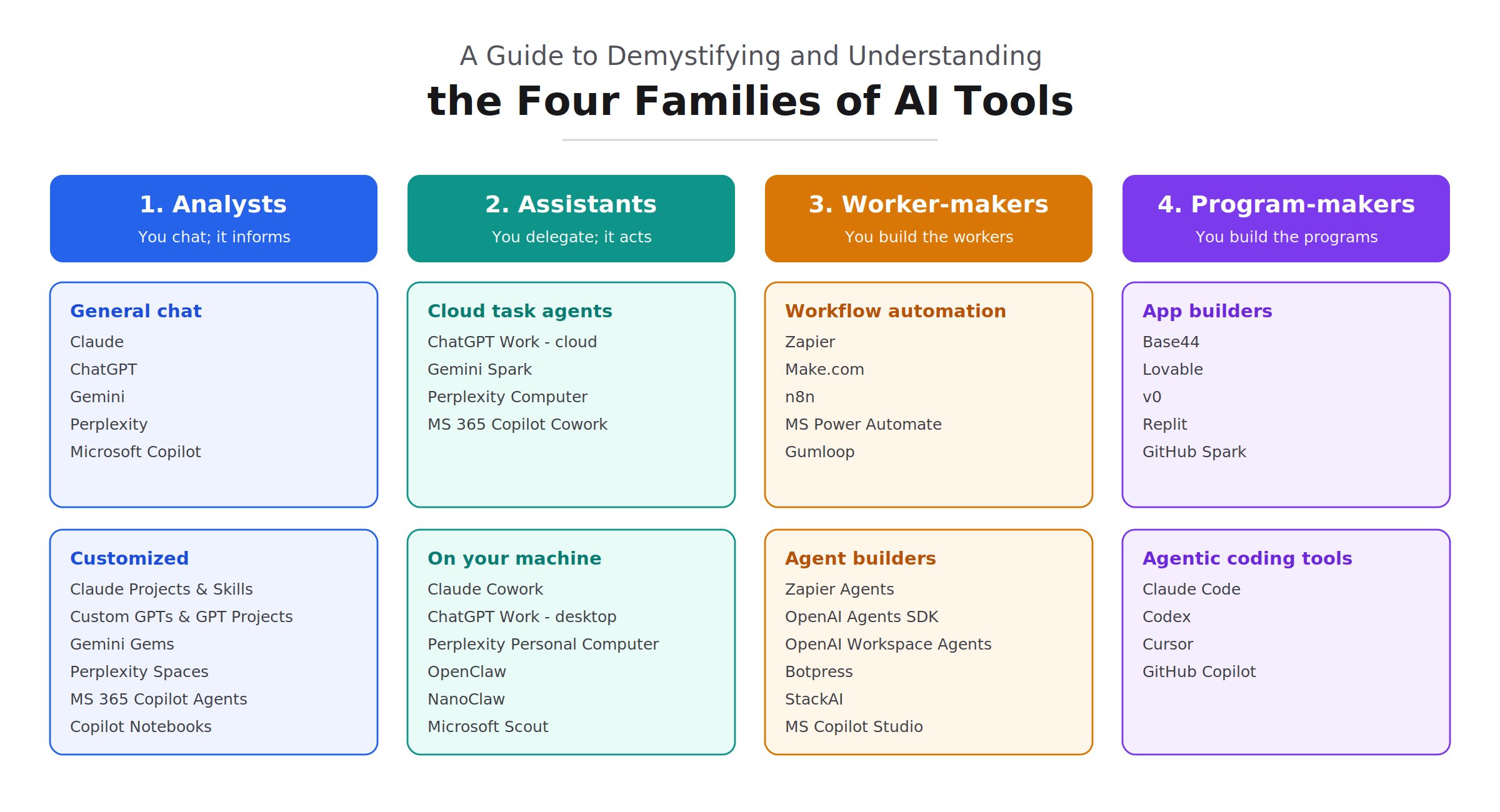
Your Framework for Your Memory
Inside each family, there are smaller groups of tools. Each family below lists those groups, with some example tools available now (July 2026) and where they fit. We do not endorse any of these tools, nor do we recommend or advise against any of them, although we do use many of them. The product names are here to make the differences between the families easier to recognize.
Family 1 – Analysts: AI tools that Analyze
For tools in this family, you chat with the AI. It can research a topic, summarize a long document, write a draft, pull out the key points, and work inside projects you have set up. For non-technical professionals, this is the most visible way to use AI as of July 2026. Think of this family as an analyst on your team. It studies things, reports back and then you decide what to do.
You will notice that many tools you already use have a built-in chat helper. When you ask that built-in helper to research or summarize, it behaves like a Family 1 Analyst, even though the chat feature is embedded in another program. The makers tend to label these helpers “Assistants.” A real human assistant can take action for you, and that is where the next family comes in.
- General chat analysts: Claude, ChatGPT, Gemini, Perplexity, Microsoft Copilot. Microsoft sells Copilot in three tiers: the free Copilot, the individual Microsoft 365 Premium, which replaced Copilot Pro, and the business Microsoft 365 Copilot that natively accesses your company data, works inside several Microsoft Office apps, and, for now, lets you choose which AI model answers, including Anthropic’s Claude and OpenAI’s models alongside Microsoft’s own.
- Customized analysts: Claude Projects & Skills, Custom GPTs & GPT Projects, Gemini Gems, Perplexity Spaces, Microsoft 365 Copilot Agents, Microsoft Copilot Notebooks
Family 2 – Assistants: AI tools that Take Action
You delegate tasks to AI, and it completes them. You can give these “task agents” selective access to your files, your mouse, and your screen, and they have connectors to other programs you use. Your instructions to a task agent can let it move a file, send an email, write a row in a spreadsheet, add a record to a database, notify your team, and more. Instead of dragging a dozen documents into a Family 1 Analyst and asking it to do a task, your task agent can find the dozens of files itself and do the work using those files, based on your instructions.
While using AI in Family 1 carries privacy and security risks, Family 2 requires even more attention. Don’t be afraid to use these tools, but approach them carefully and put safeguards in place. You must accept some risk in order to use these tools. “Cloud task agents” that run in the cloud put you at risk if an attacker can find a way to exploit weaknesses in them by using techniques such as “prompt injection” to trick your AI task agent into working for them. One goal threat actors have is to trick your task agent into sending them sensitive information. Once you start using “on your machine” task agents that might have access to your local computer, including accessing some files on your drives and the ability to imitate you by moving the mouse and clicking the mouse buttons, based on what it “sees” on your screen, your risk increases. If your AI behaves irrationally, or an attacker is able to take control of it, you’re more exposed.
- Cloud task agents: Gemini Spark, Perplexity Computer, ChatGPT Work on the web or your phone, and Microsoft Copilot Cowork (cloud task agent) run in the cloud. As with everything in all these families, be aware of privacy and security risks.
- On-your-machine task agents: Claude Cowork, ChatGPT Work in the desktop app, Perplexity Personal Computer, OpenClaw, NanoClaw, and Microsoft Scout. Be especially aware that if you use these task agents running on your machine, they can pose enormous security risks in some cases. Scout, built on the open-source OpenClaw project, is still an early-access preview as of late July 2026.
The difference in Family 2 compared to Family 1 is that here you end up with a completed task, something a task agent did for you based on your instructions right then.
Family 3 – Tools that let you create workers
This family is where you build highly skilled workers who can start on their own at an event, such as when an email arrives or at a set time of day. You manually start the Family 2 tools. Family 3 helps you produce task agents that can start automatically, without you needing to be present.
There are two kinds of workers you can make here. The first is a workflow in which you lay out every step yourself, so the result is predictable and repeatable. You have the option to add or not add AI to your workflow, and the difference is massive. AI reasons on its own, so you will not always get the same result if you use AI within a workflow. When you add an AI step to a workflow, it can return different results each time, and that variation can disrupt the operation of the otherwise predictable steps that follow. Workflows can be composed of steps that do not have to use AI at all, so the workflow is predictable, which is essential for work that must be accurate every time, such as exact statistical or financial calculations.
The second type of AI in Family 3 is a task agent builder. Instead of writing out every detailed step, you give the worker a goal and let it work out the steps on its own. You design a worker that you will not tell what to do; you just give it an outcome to achieve. Because you don’t define the steps exactly, a task agent may produce different results each time you use it.
Both kinds run automatically when an event occurs, such as an email arriving, and both let you hand off tasks you used to do manually. The difference is whether you want to define the steps or let AI choose its own steps to achieve your result. The first can be predictable if you leave AI out of the steps, and the second can be fluid, flexible and adaptable, but be prepared that you might not always get a result you expected.
- Workflow automation: Zapier, Make.com, n8n, Gumloop, Microsoft Power Automate
- Agent builders: Zapier Agents, OpenAI Agents SDK, OpenAI Workspace Agents, Botpress, StackAI, Microsoft Copilot Studio. (OpenAI’s no-code Agent Builder, which used to accompany the Agents SDK, is being retired on November 30, 2026. OpenAI now points programmers to the Agents SDK and everyone else to Workspace Agents.)
Family 4 – Tools that let you write programs
With these tools, you explain a program in plain English, and the AI writes it for you. This activity is called vibe coding. AI helps you add features and upgrade your program whenever you want, without you needing to learn how to program. Experienced developers use this family too, to speed up their own work.
There are two kinds here. The first kind, called app builders, write the program and host it for you in their cloud, so you stay in plain English from start to finish. You won’t need to understand much about how programs work on the backend.
Other tools, called agentic coding tools, write code you can run wherever you like, giving you more power and showing you more of the moving parts. You’ll have an opportunity to get a little deeper into what is going on, and the AI tool can help you through the process. Having the flexibility not to be locked into a specific vendor’s cloud can be appealing in some cases.
- App builders: Base44, Lovable, v0, Replit, GitHub Spark. GitHub Spark, which Microsoft owns, is still in preview as of late July 2026.
- Agentic coding tools: Claude Code, Codex, Cursor, GitHub Copilot.
Terminology
Now that we have covered the families as a framework, here are some terms in case any of them are new to you.
Agent. The term “Agentic AI” refers to AI that can take action, and the word “agent” always benefits from a descriptor next to it, such as “coding agent” for an agent that writes code, “task agent” for an agent that performs tasks, and so on.
Embedded AI. This is when software you already own has AI features built in, such as a chat helper in your email or a spreadsheet. Usually, embedded AI is a feature you enable, not a separate tool.
Connections. Connectors provide access. This is how programs connect to other programs you use, online services, databases, and everything else. For AI to work in the real world, and to reach the data sitting in your databases and elsewhere, you need connectors. You may see the terms API and MCP. MCP is now the standard nearly every major AI vendor supports, including OpenAI, Google, Microsoft, and Anthropic, and vendors are starting to offer versions that reach your private servers using only outbound connections, so you do not have to open an inbound hole in your firewall. I will cover both in a future article. They are the backbone of most connectors that provide access. Access by itself is not enough, though. The tool also needs to know what to do with that access, which leads to the next term below, skill.md. Connectors carry a significant risk if a threat actor compromises one. We call this “east-west” security because it involves data flowing between programs, as opposed to the traditional “north-south” security that protects your data and systems via a firewall. Using connectors bypasses firewall protection because your SaaS applications can communicate with each other without the conversation ever passing through the traditional firewall at your network perimeter, where your network connects to the outside world. This east-west traffic is harder to see and control than traditional perimeter traffic, and it should be on your CISO’s radar, especially if workers set up connections without their knowledge or approval. Threat actors target connectors. I will cover service-to-service, API, and MCP security inside and between environments in more detail in a future article.
SKILL.md. This is a file that teaches AI how to do a task the way you want it done. The skill file often includes instructions on how to work with another program you have connected to, and it can also hold your own process, such as your style, checklist, or standards. The connector gives the AI access; the skill file gives it the know-how to do a great job. As an aside, the “md” in the file name stands for “markdown,” and md files are saved as plain text you can read and edit in a basic app such as Notepad or TextEdit. People often say “skills” out loud, while the file itself is usually named SKILL.md. Just as you train a new worker at your organization, you can use a skill file, along with related markdown files, to train your task agents and other AI tools.
AaaS. Agent as a Service is a way you can pay for task agents to perform specific tasks for you. Their features fit in Family 2 above, and they are useful when you just want to pay for a result. For example, you might pay a monthly fee for a task agent to run your lead follow-up and clean up your sales pipeline.
Loops. Looping is a recursive process in which the AI plans, acts, observes, and refines, then repeats the cycle, starting with refined planning. Each pass through the loop can improve the result. Keep in mind that more loops do not always mean a better answer; the gains usually are higher during the first rounds. As of now, a loop can drift in the wrong direction if it is unsupervised and runs too many times. Looping also uses a lot of computing power, known as “compute,” which can mean a high token cost, the next term.
Tokens. Companies such as Google, OpenAI, and Anthropic charge you to use their models, and the unit they use to measure usage is called a token. To give you a rough idea, a token is about three-quarters of a word in the English language. If you are using a Family 1 chat tool for a monthly fee, you usually are not billed by the number of tokens you use, but you might find yourself temporarily restricted if you reach a specified limit. The other families may have features that result in your getting charged per token. You use more tokens when you run more activities, open larger files, and run processes more often. You are charged for both what you send to the model and what it sends back to you. The topic of saving money with AI while being charged per token deserves special attention, because some companies are finding AI is becoming very expensive for them. I will write an article about that soon, probably next week.
Conclusion
You now have a shared vocabulary and, more importantly, a framework for filing AI tools into families. Share this with your friends so that, as new AI tools arrive, and they will keep arriving quickly, they can file each tool into its family and help keep their sanity while everything else keeps changing.